
If you run a WordPress website, WordPress security should be one of your top priorities—whether you manage a personal blog, business website, or eCommerce store.
WordPress powers over 43% of the internet, making it a prime target for hackers. In my early days managing client websites,If you run a WordPress website, WordPress security should be one of your top priorities—whether you manage a personal blog, business website, or eCommerce store.WordPress powers over 43% of the internet, making it a prime target for hackers. In my early days managing client websites, I assumed security issues only affected “big sites.” That assumption cost me a hacked site, injected spam links, and hours of cleanup. The lesson was clear: security vulnerabilities don’t discriminate.
Understanding WordPress Security Vulnerabilities
WordPress itself is secure at its core. The real risk comes from how WordPress is used, configured, and maintained.
What Is a WordPress Security Vulnerability?
A vulnerability is a weakness that attackers exploit to gain unauthorized access, inject malicious code, or steal data.
According to a report by Wordfence, over 95% of WordPress hacks originate from plugins, themes, or poor configuration—not WordPress core itself.
Common WordPress Security Vulnerabilities (Comparison Table)
| Vulnerability Type | Risk Level | Common Cause | Impact |
|---|---|---|---|
| Outdated Plugins & Themes | High | Poor maintenance | Malware injection |
| Weak Passwords | High | Human error | Account takeover |
| SQL Injection | Critical | Poor input validation | Database theft |
| Cross-Site Scripting (XSS) | Medium | Insecure forms | Data hijacking |
| Brute Force Attacks | Medium | No login protection | Admin lockout |
| File Permission Issues | Medium | Wrong server setup | File manipulatio |
1. Outdated Plugins & Themes (The #1 Threat)
Why This Happens
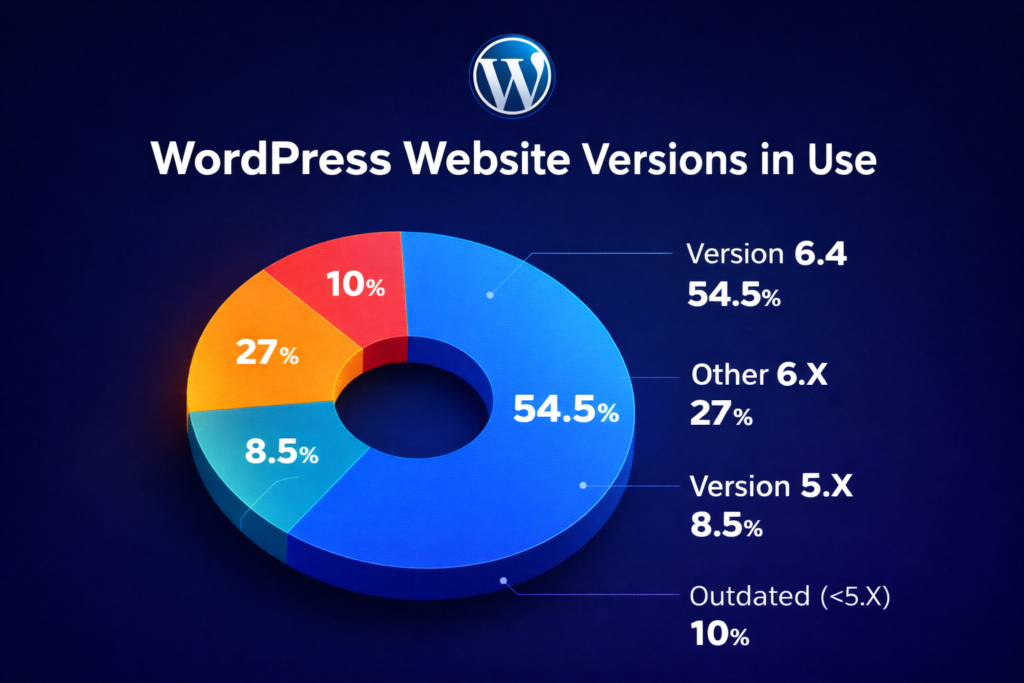
Many site owners install plugins and forget them. Over time, developers patch vulnerabilities—but outdated versions remain exposed.
A single vulnerable plugin can compromise your entire site.
Real Insight
I once audited a site with 47 plugins—12 were abandoned. One outdated slider plugin caused repeated reinfections even after cleanup.
Solution
- Delete unused plugins and themes
- Use only well-reviewed plugins from the WordPress Plugin Directory
- Enable auto-updates where possible
- Schedule monthly plugin audits
Call-to-Action (CTA)
👉 Want a secure WordPress site without stress?
- Review your plugins today
- Install a trusted security plugin
- Subscribe to our blog for weekly WordPress security tips
💬 Have questions or security experiences? Share them in the comments—we’d love to hear from you.
